This is a result of an account having many publisher accounts linked to it and overwhelming the system while trying to return data. These are usually 3PL Publisher accounts.
Since LSI accounts are not supported in Ad Hoc reporting, have an Admin user deselect the LSI accounts linked to the main Publisher account (Association/Group) which should eliminate the error.
Perform the following steps:
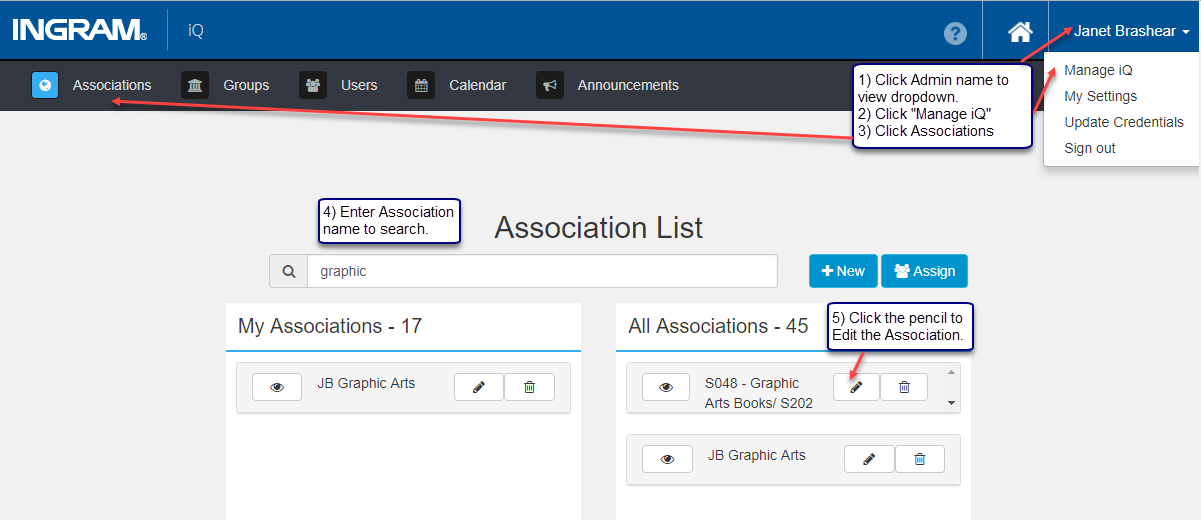
1) Click the Admin User Name in the top right corner to view the drop-down. 2) Click Manage iQ from the drop-down.
3) Click Associations. 4) Enter the Association Name (Publisher) in the search field.
5) Select the Association and click the pencil button to Edit the Association
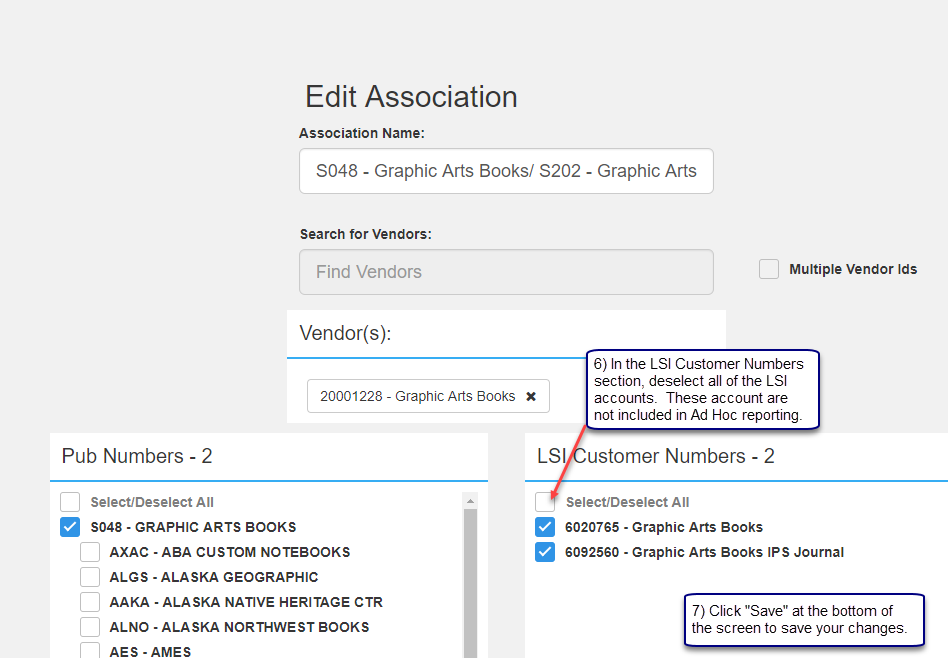
6) In the LSI Customer Numbers section, click the Select/Deselect All box to uncheck all LSI accounts.
7) Click Save.
Click the Ingram logo, iQ or the Home icon to exit the Admin functionality and to access the Home page.
Click Ad Hoc from the menu bar and continue creating or accessing Ad Hoc reports.
Comments
0 comments
Please sign in to leave a comment.