Applies to all panels with a Time Selection button (Last 30 Days).
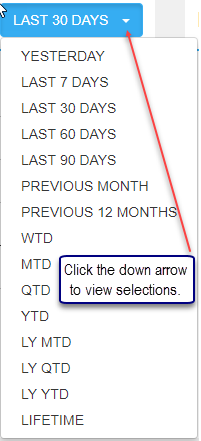
Many panels have a Time Selection button. The default time period is Last 30 Days but options range from Yesterday through the Lifetime of the product. Most time drop downs have the options listed in the screenshot below. The Trending Top 5 Titles panel on the Sales Dashboard is the exception with LAST 30, 60 and 90 DAYS as selection options. (It was getting very confusing when "Trending" was applied to various periods to calculate the "Previous" time period. Now, it has been decided to only include 30 day increments.)
Click the down arrow in the time button to view all possible selections. To calculate time periods, we use the "end of day" of the previous day as the current period ending date. The "Last 30 Days" time period is derived by using the previous day minus 30 days to obtain a Start Date. Please make note of the difference between 'Last 30 Days', 'MTD' and 'PREVIOUS MONTH'. MTD is from the first day of the month through the "end of business" yesterday while PREVIOUS MONTH is the calendar month of the preceding month.
Example of how Last 30 Days is calculated: Today is 06/26/17. We use 06/25/17 (yesterday) minus 30 days which is 05/27/17. This means "Last 30 Days" has a start date of May 27 and end date of June 25. Some examples of how other Time Periods are calculated are as follows:
- Last 60 Days - Start Date is 04/27/17 and End Date 06/25/17. (06/25/17 minus 60 days makes the Start Date 04/27/17)
-
MTD (Month to Date) - Uses the actual calendar month. In this case the date range is 06/01/17 through 06/25/17 (“end of day” of the previous day).
-
LY MTD (Last Year Month to Date) - Looks at 06/01/16 through 06/25/16. (The same range as MTD but for the previous year.)
-
PREVIOUS MONTH - Uses the calendar month so the Start Date is 05/01/17 and End Date 05/31/17.
Comments
0 comments
Please sign in to leave a comment.